
Customer support · Engineering · Customer Success
Support-to-engineering handoff: a practical guide and free template
Give engineering a clear issue to investigate while keeping someone responsible for the customer update. Use the checklist, download the plain-text template, and follow a fictional worked example.
Plain text. No signup or email required.
What is a support-to-engineering handoff?
A support-to-engineering handoff transfers a customer issue from frontline investigation to the people who can assess a product defect or technical change. It should preserve the original customer context, distinguish observed facts from assumptions, and make the next action explicit.
The engineering task and customer communication are different responsibilities. Name who owns each, even when one person is responsible for both. Forwarding a message alone does not establish either responsibility.
When should support involve engineering?
Use your team's agreed escalation criteria. Common reasons include a suspected product defect, a failure that needs access support does not have, or an unresolved issue with a meaningful customer impact. An escalation should explain why another team is needed, rather than simply repeat that the customer is unhappy.
Record what support has already checked and whether a workaround is confirmed. If the cause or scope is unknown, say so. A customer's deadline is useful context; it is not automatically an agreed engineering delivery date.
Seven things to include in the handoff
- 1. Issue and source
- A short description, the original case reference and a permitted link to the customer's message.
- 2. Customer impact
- What the customer cannot do, who is confirmed affected, and the business task or deadline involved.
- 3. Observed behavior
- Expected versus actual behavior, environment and reproduction steps when known. Mark anything not yet reproduced.
- 4. Evidence and prior checks
- Relevant excerpts, permitted screenshots or log references, checks already performed and any confirmed workaround.
- 5. Investigation owner
- The person or team receiving the technical question, the proposed next check, and whether that handoff has been accepted.
- 6. Customer-update owner
- Who will keep the customer informed and the next update time agreed with the customer or team.
- 7. Verification and closure
- How the team will check the result and confirm the customer's workflow is usable before treating the issue as resolved.
Keep credentials and unnecessary personal information out of the handoff. Reference evidence in approved systems and share only what the receiving team is permitted to access.
Get these fields as a reusable plain-text templateFictional worked example
Finance needs an export. Your teammate is away.
“We need the finance export for our month-end report. Please confirm who is checking the rollout and when we can try it again.”
A useful handoff preserves that request and separates the technical check from the customer update:
- Impact
- Finance is waiting to complete its month-end report. The scope beyond this reported workflow is unconfirmed.
- Known and unknown
- The export is not yet confirmed usable. Whether the rollout is complete and whether a sample export succeeds still need verification.
- Proposed engineering action
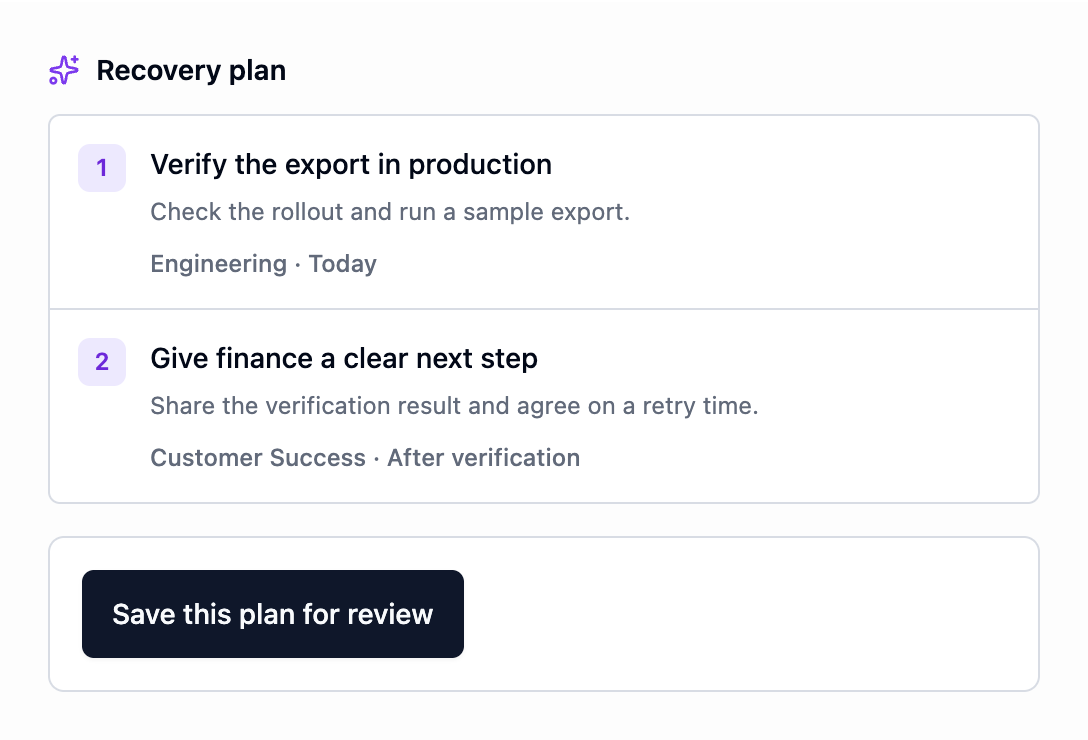
- Check the rollout and run a sample export. The receiving team must review the proposed work and ownership.
- Proposed CS action
- Share the verification result with finance and agree when to retry. Confirm a next update time rather than inventing a resolution deadline.
- Completion check
- Verify the export and confirm the customer can continue the affected workflow. A closed internal task alone is not that confirmation.
The handoff continues after engineering accepts it
- Confirm acceptance. Make sure the receiving person or team has accepted the investigation, rather than assuming a forwarded message has an owner.
- Keep the customer update separate. The communication owner follows up even when the technical answer is not ready. Use the agreed update time and distinguish progress from a confirmed fix.
- Preserve new findings. Add results and remaining questions to the case so the next teammate can understand what changed.
- Verify the outcome. Check the affected workflow and confirm the customer's next step. Keep unresolved questions visible.
From the handoff to reviewed work
Explore a Rescue Room in IO Spoke
IO Spoke brings recorded customer context, supporting evidence and proposed recovery work together for review. The public walkthrough follows a fictional case through its source timeline, commitments and proposed plan.
14 days free. No credit card. Then $299 per organization per month.
You can add a conversation manually without connecting a support tool. For evaluation, use fictional or non-confidential content until applicable processing terms and permitted use are agreed. Read the service terms status.